
Headless CMS Architecture Explained: How Content Moves from CMS to Frontend
How headless CMS platforms deliver content seamlessly to modern frontend applications through APIs.
In our previous newsletter, we explored what a Headless CMS is, why businesses are adopting it, and how it enables content to be delivered across multiple digital channels. But one important question remains: How does content actually move from a Headless CMS to a website, mobile application, or web application? The answer lies in the architecture. Understanding this architecture helps us see how content moves from the people who create it, through the CMS and APIs, and finally into the digital experiences used by end users.
Let’s break it down. 👇
What Is Headless CMS Architecture?🧠
A Headless CMS separates content management from content presentation. In a traditional CMS, content management and presentation are often closely connected, meaning the CMS may control both the content and the way that content is displayed. In a Headless CMS, the CMS is primarily responsible for creating, managing, storing, and publishing structured content, while applications retrieve that content through APIs and decide how to present it.
A simplified architecture looks like:
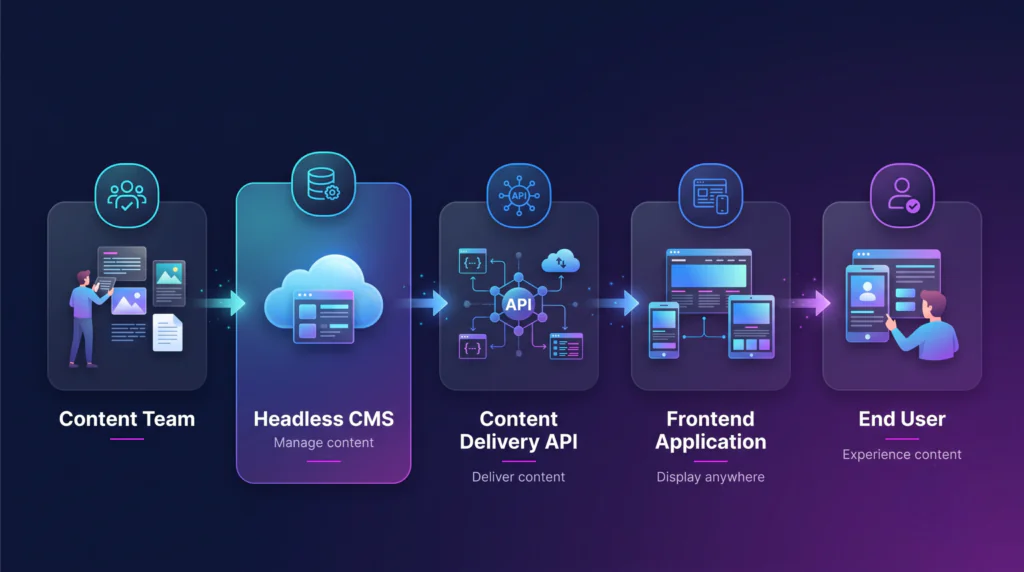
The frontend application could be:
- Website
- Mobile application
- Web Application
- E-Commerce application
- Digital display
Other connected digital experiences
🧩 Step 1: Define the Content Model
Before creating content, teams typically define content models. For example, an e-commerce application might have a Product content model containing product name, description, images, features, price, and category. A content model defines the structure and relationships of the information and provides a consistent way for teams to create and manage different types of content.
Instead of creating content as one large block of HTML, structured content can be organized into reusable fields. This makes the content easier to manage and consume across different channels. The content model focuses on what information needs to exist, while the frontend later determines how that information should be presented to users.
A Product content model might contain:
- Product name
- Description
- Images
- Features
- Price
- category
Step 2: Create and Manage Content
Once the content model is defined, content editors can create content using the CMS. For example, a product could contain Product Name: CloudPro, Description: Enterprise cloud management platform, Features: Security, scalability, analytics. The editor works with the structured fields provided by the content model instead of directly working with the frontend application or its design.
The content is managed independently of the frontend design. The editor focuses on the content, while developers decide how that content should appear in the application. This separation is one of the fundamental characteristics of a Headless CMS because it allows content teams and development teams to work independently while still using the same content foundation.
🔄 Step 3: Content Goes Through a Publishing Workflow
Content isn’t always published immediately. Depending on the CMS and organization, content may move through a workflow such as Draft → Review → Approved → Published. This allows organizations to control how content moves from creation to publication and ensures that content can be reviewed before it becomes available to users.
Draft content can be edited or reviewed without being exposed to the public delivery API. Once content is published, it becomes available through the CMS’s content delivery mechanism. This is especially useful for organizations with multiple content editors, reviewers, and approval processes, where content may need to pass through several stages before it reaches the end user.
🔌 Step 4: APIs Connect Content to Applications
This is where the Headless architecture becomes powerful. A frontend application typically doesn’t access the CMS’s underlying database directly. Instead, it retrieves content through an API provided by the CMS or its content delivery layer. The API acts as the connection between the content managed inside the CMS and the applications that need to consume that content.
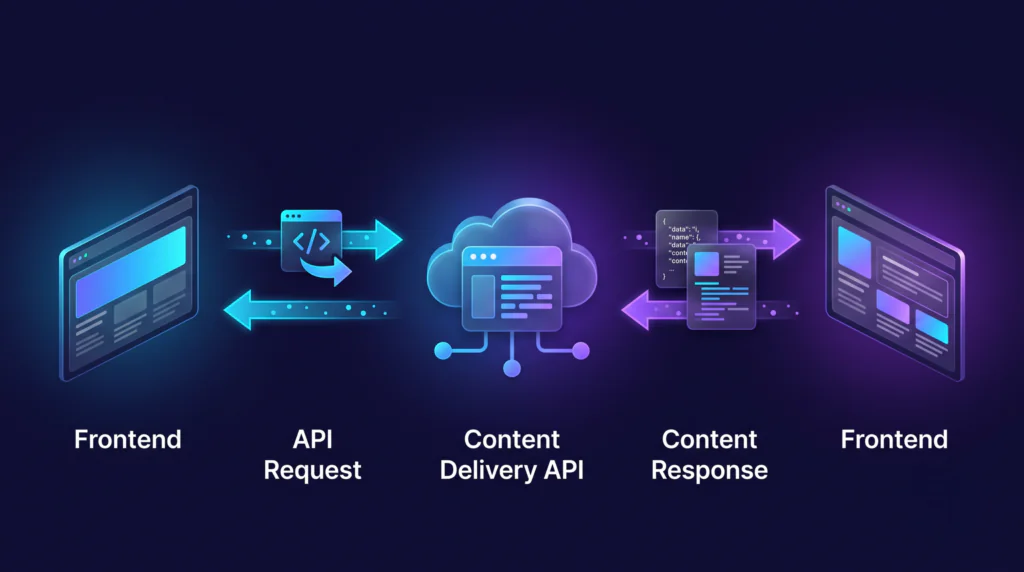
Headless CMS platforms commonly provide APIs using approaches such as:
- REST API — Content is accessed through defined resources and endpoints.
- GraphQL — Applications can query for specific fields and related data.
The API provides a structured way for applications to consume content without depending on the CMS’s presentation layer. This means the frontend does not need to know how the CMS internally stores the content; it only needs to request the content it needs through the available delivery mechanism.
⚛️ Step 5: The Frontend Renders the Content
After retrieving content, the frontend application determines how that content should be presented to users. For example, a website could use a frontend framework such as Next.js to retrieve content from the CMS and render it as part of the website experience. The same approach can also be used by a mobile application or another digital platform.
The frontend is responsible for things such as:
- Layout
- Components
- Styling
- Navigation
- Interactions
- User experience
The same underlying content can therefore be presented differently depending on the platform. For example, a product may appear as a detailed page on a website but as a compact card inside a mobile application. The content remains centralized while each application controls its own presentation.
🌐 One Content Source, Multiple Experiences
Consider a company that manages product information. The team creates the product content in the CMS, and that content can then be consumed by multiple applications through APIs. Instead of creating separate versions of the same content for every platform, the organization can maintain a centralized content source that different applications can access.
A simplified architecture could look like:
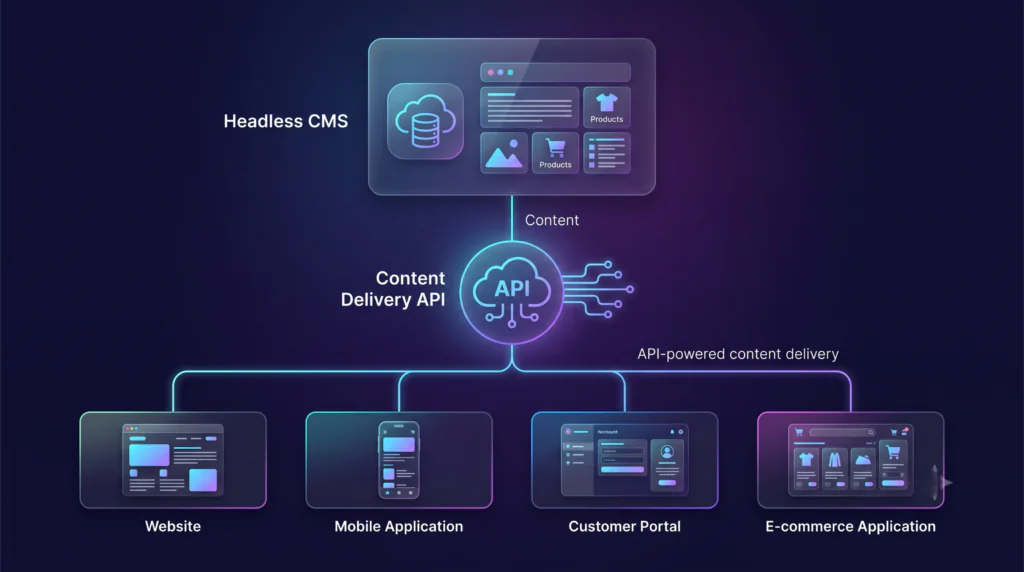
Each application can use the same content while implementing its own presentation and user experience. This is one of the major advantages of treating content as structured data because the content can be reused across multiple digital channels without forcing every application to follow the same presentation.
⚡ Step 6: Where Do Caching and CDNs Fit?
In a production architecture, applications may use caching and Content Delivery Networks (CDNs) to improve performance and reduce repeated requests to the origin content service. Instead of every request needing to reach the origin content service, caching layers can help deliver content more efficiently depending on the architecture and configuration.
A simplified delivery path could look like:
Frontend / Application
Cache or CDN
Content Delivery API
CMS Content
The exact architecture depends on the CMS, frontend framework, rendering strategy, hosting environment, and caching configuration. For example, a frontend application might use different rendering and data-fetching approaches depending on how the application needs to retrieve and update content.
These approaches can include:
- Server-side rendering (SSR)
- Static site generation (SSG)
- Incremental/static revalidation
- Client-side data fetching
Each approach has different implications for when and how content is requested and updated. Therefore, caching and rendering strategies are important parts of the overall Headless CMS architecture.
🔔 Step 7: What Happens When Content Changes?
Let’s say an editor changes a product description. Once the updated content is published, it needs to move through the content delivery architecture before the updated version is reflected in the frontend experience. A simplified flow could be:
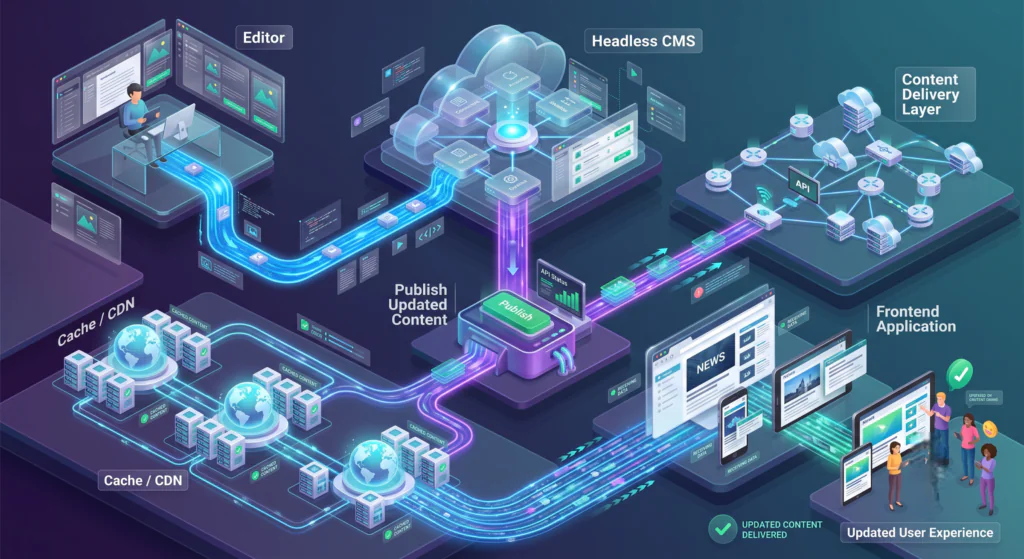
However, an important point is that publishing content does not necessarily mean every user sees the new version immediately. Caching, CDN configuration, frontend rendering strategy, and revalidation rules can affect when the updated content becomes visible to users.
Some architectures also use webhooks to notify other systems when content is published or updated. For example, a webhook could trigger:
- Cache invalidation
- Frontend revalidation
- A rebuild
- Search index updates
- Other automated workflows
Webhooks are notification mechanisms; they don’t replace the content delivery API. Their role is to notify other systems that a particular content event has occurred so that additional automated actions can take place.
🔐 Step 8: Security and Access Control
A production Headless CMS architecture also needs appropriate security controls. Depending on the platform and application, this may include API authentication, authorization, role-based access control, environment separation, secure handling of API credentials, and protection of draft or unpublished content.
A key principle is:
Public applications should only have access to the content and API capabilities they actually need.
Sensitive CMS management credentials should never be exposed in client-side application code. Separating management access from the capabilities required by public applications helps ensure that applications only receive the level of access they actually require.
👨💻 What Does This Mean for Developers?
Headless architecture gives frontend teams greater control over the presentation layer. Developers can choose technologies and architectures that fit the application rather than being tied to the CMS’s built-in templating system. This means frontend teams can work with the frameworks and approaches that best suit the specific requirements of the application.
This separation allows content and presentation to evolve independently, while the API provides the connection between them. The content team can manage the information while developers control how that information is transformed into the final digital experience.
🔄 The Complete Headless CMS Flow
Let’s bring everything together. The complete Headless CMS architecture starts with defining how content should be structured and continues through content creation, review, publishing, delivery, caching, frontend rendering, and finally the end-user experience.
Content Modeling
Define the structure of the content.
Content Creation
Editors create and manage content.
Review & Publishing
Content is reviewed and published according to the organization's workflow.
Content Delivery API
Applications request published content.
Cache / CDN
Content may be cached to improve performance and scalability.
Frontend Application
The application retrieves the content and renders the appropriate experience.
End User
The final digital experience is delivered to the user.
In Simple Terms
Model → Create → Review → Publish → Deliver → Render → Experience
That’s the foundation of a Headless CMS architecture. While real-world implementations may include additional systems and configurations, this flow represents the core journey of content from the CMS to the final digital experience.
🚀 Final Thought
The real value of a Headless CMS isn’t simply that it separates the backend from the frontend. Its real strength is the ability to manage structured, reusable content independently from the way that content is presented. This allows the content foundation to remain separate from the technologies and interfaces used to deliver that content.
APIs provide the connection between the content and the applications that consume it. This allows organizations to build different digital experiences while maintaining a centralized content foundation. The same structured content can therefore support different applications while allowing each application to control its own presentation and user experience.
As digital platforms continue to evolve, this separation can provide the flexibility needed to support new channels, technologies, and user experiences. Organizations can maintain their content independently while continuing to build and adapt the applications that consume it.