
Headless CMS Migration: Best Practices for Moving Content Without Losing SEO Rankings
Learn how to migrate to a headless CMS without compromising your SEO performance by following proven best practices for preserving organic traffic, maintaining URL structures, implementing proper redirects, optimizing metadata, and protecting search engine visibility throughout the migration process.
Introduction
Migrating to a Headless CMS allows businesses to modernize their content infrastructure, improve frontend flexibility, and deliver content across multiple digital platforms. However, migration involves more than transferring content from one system to another. Changes to URLs, metadata, frontend rendering, internal links, and server responses can affect how search engines crawl and index a website. Without proper planning, these changes may lead to ranking fluctuations and organic traffic loss.
A successful Headless CMS migration requires a structured approach that combines content migration, frontend development, and technical SEO. By auditing the existing website, preserving important SEO elements, testing the new implementation, and monitoring performance after launch, businesses can reduce migration risks while building a more flexible digital experience.
What Is Headless CMS Migration?
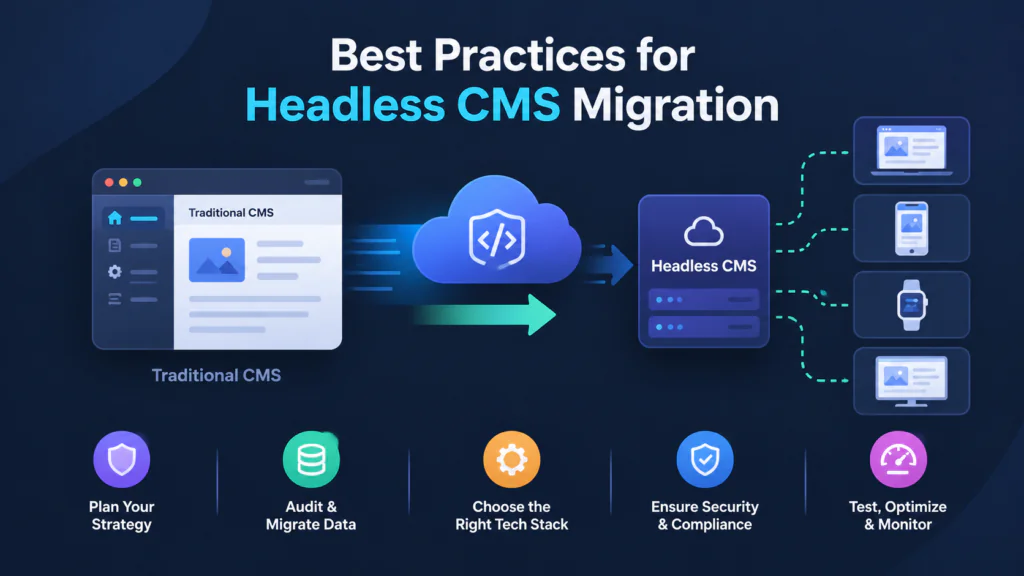
Headless CMS migration is the process of moving website content from a traditional CMS or another content management platform into a headless content management system. Unlike a traditional CMS, a headless CMS separates content management from the frontend presentation layer. Content is typically delivered through APIs and rendered by a separately developed frontend application.
During migration, existing pages, media assets, metadata, URLs, and content relationships must be mapped to the new system. Developers must also ensure that the frontend renders content correctly, generates appropriate SEO metadata, and allows search engines to access important pages. The goal is to modernize the content infrastructure while preserving valuable existing functionality and search visibility.
Why SEO Matters During a Headless CMS Migration
Search engines use several signals to discover, understand, and index website content, including URLs, page content, internal links, canonical tags, structured data, and HTTP responses. A CMS migration can change these elements even when the website looks similar to visitors. For example, changing URL structures without appropriate redirects can leave search engines and users accessing outdated addresses.
Headless architecture does not automatically improve or damage SEO. The outcome depends on how the frontend, APIs, rendering strategy, and technical SEO elements are implemented. Preserving established URLs where possible, maintaining relevant content, and validating crawlability before launch can help minimize unnecessary disruptions to organic search performance.
Best Practices for Headless CMS Migration
1. Audit Existing Content and SEO Performance
Before starting the migration, conduct a comprehensive audit of the current website. Identify important landing pages, blog posts, product pages, indexed URLs, organic traffic sources, and pages that receive valuable backlinks. Tools such as Google Search Console, Google Analytics, and website crawlers can help establish a baseline for existing SEO performance.
The audit should also document page titles, meta descriptions, canonical tags, heading structures, image alt text, structured data, and internal links. This information becomes a reference for validating the new website after migration. Prioritize pages that generate significant traffic or conversions so that critical content receives additional attention during implementation and testing.
2. Create a URL Mapping and Redirect Strategy
URL management is one of the most important technical SEO considerations during a CMS migration. If the new website changes the URL structure, create a mapping document that connects each old URL to its corresponding new destination. Whenever practical, retain existing URLs to reduce unnecessary changes and simplify migration.
For URLs that must change, implement permanent server-side 301 redirects to the most relevant new pages. Avoid redirect chains, redirect loops, and redirecting unrelated pages to the homepage. Update internal links and canonical tags to reference the final destination URLs rather than relying on redirects. Keep redirects in place for as long as they are needed, particularly when old URLs continue to receive traffic or backlinks. Maintaining them for at least a year is a useful general recommendation, not a strict requirement.
3. Preserve SEO Metadata and Content Structure
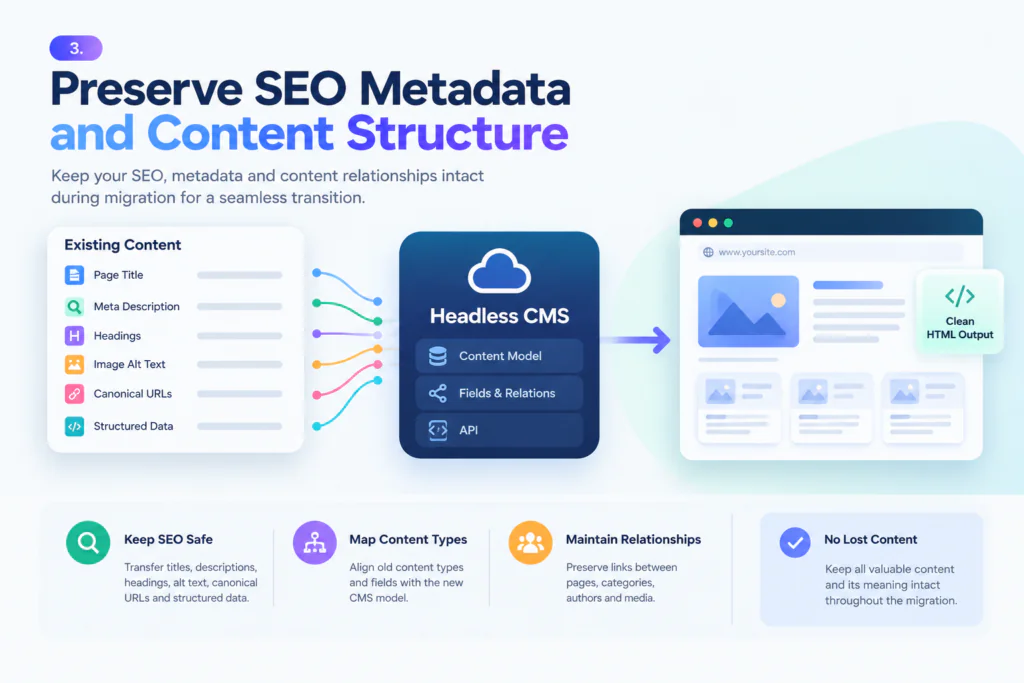
During migration, ensure that important content and SEO metadata are transferred correctly into the new content model. This includes page titles, meta descriptions, headings, image alt text, canonical URLs, and applicable structured data. Your headless CMS should provide the necessary fields, while the frontend must use those fields to generate the appropriate HTML output.
Content modeling requires particular attention because the new CMS may organize content differently from the previous platform. Map existing content types and fields to their new equivalents, preserving essential relationships between pages, categories, authors, and media assets. Avoid unintentionally removing useful content or changing the meaning of important pages during the transformation.
4. Implement Search-Friendly Frontend Rendering
In a headless architecture, the frontend is responsible for presenting content to users and making it accessible to search engines. Client-side rendering can be indexed by search engines, but it may introduce additional rendering complexity and delays. Depending on the framework and application requirements, server-side rendering (SSR), static site generation (SSG), or incremental static regeneration (ISR) can help deliver content efficiently.
These rendering approaches do not automatically improve rankings. Regardless of the strategy, verify that important page content, titles, canonical tags, and other metadata are available in the rendered HTML and that search engines can access them. Ensure that pages return appropriate HTTP status codes, such as 200 for successful pages and 404 for genuinely missing content. Do not assume that content available through a CMS API is automatically accessible or indexable through the public website.
5. Validate Structured Data and Canonical Tags
Structured data helps search engines interpret specific types of content, such as articles, products, and breadcrumbs. If your existing website uses structured data, verify that the new frontend continues to generate accurate markup that matches the visible page content. Use Google’s Rich Results Test where applicable to check eligibility and identify validation issues. Valid structured data does not guarantee that a page will receive a rich result in search.
Canonical tags are also important when multiple URLs contain identical or substantially similar content. Configure canonical URLs consistently, using the preferred absolute URL for each indexable page. Ensure that canonical tags do not point to staging environments, redirected URLs, or unrelated pages. Canonical tags are signals that help search engines select a preferred URL, rather than absolute directives that guarantee which URL will be indexed.
6. Update XML Sitemaps and Internal Links
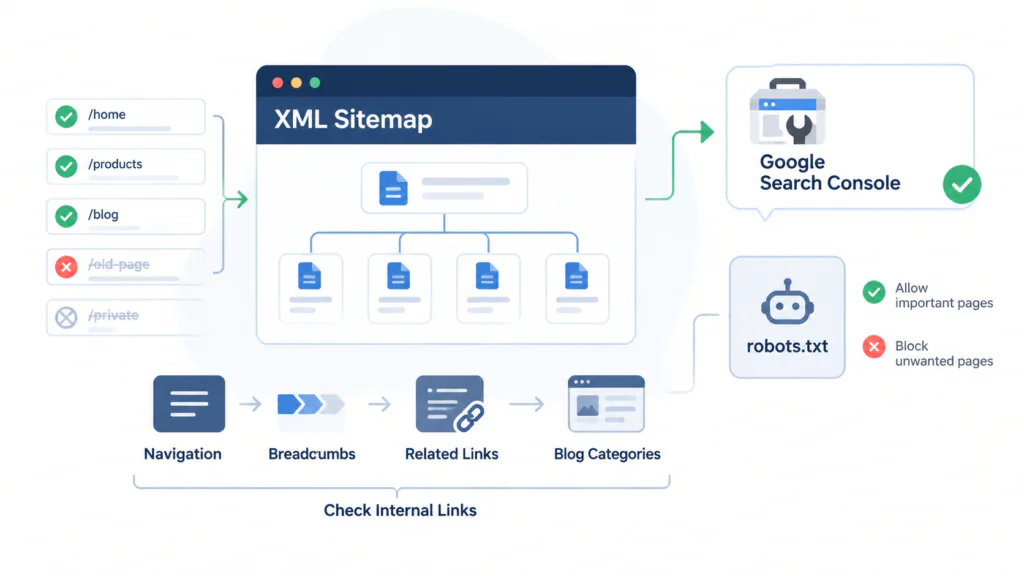
An XML sitemap helps search engines discover important URLs on the new website. Generate a sitemap containing the canonical, indexable URLs you want search engines to discover. Remove URLs that are redirected, blocked from indexing, or no longer available. Submit the updated sitemap through Google Search Console after launch.
Review internal links throughout the website to ensure that they point directly to the correct destination URLs. Check navigation menus, breadcrumbs, related-content links, and blog category pages. Also review the robots.txt file to confirm that important pages and required resources are not unintentionally blocked from crawling.
7. Test the Website Before Launch
A staging environment allows developers and SEO teams to validate the new implementation before it becomes publicly available. Crawl the staging website, test redirects, inspect rendered HTML, validate metadata, and confirm that key templates work correctly across devices. Where appropriate, protect staging content with authentication or access restrictions to prevent unintended public access and indexing.
Before launch, establish a checklist for critical URLs and test representative pages from every major content type. Confirm that valid pages do not return unexpected 404 errors, canonical tags point to the correct destinations, and important pages do not contain unintended noindex directives. Also verify that the production environment uses the correct domain, HTTPS configuration, sitemap, and robots.txt settings.
8. Prepare a Safe Migration Launch Plan
A structured launch plan helps teams minimize technical SEO issues when switching from the existing CMS to the new headless CMS. Coordinate developers, content managers, and SEO specialists to ensure that all critical elements are ready before deployment.
Key launch preparations include:
Create a pre-launch backup
Keep a backup of the existing website, content, URL structures, and configuration files so that the team can investigate issues or recover important data if necessary.
Verify DNS and hosting configuration
Ensure that domain settings, SSL certificates, CDN configuration, and hosting infrastructure are correctly configured before switching to the new frontend.
Check redirect implementation
Test important old URLs against their mapped destinations to confirm that permanent redirects work correctly and do not create loops or unnecessary redirect chains.
Validate production settings
Confirm that the production website uses the correct canonical URLs, robots.txt directives, indexing settings, and XML sitemap.
Assign launch responsibilities
Define who will monitor technical issues, validate important pages, and respond to unexpected errors immediately after deployment.
Preparing these elements before launch helps reduce avoidable downtime, crawling problems, and indexing issues during the transition to the new CMS.
Headless CMS Migration SEO Checklist
Use this checklist to verify the most important migration requirements.
| Area | What to verify |
|---|---|
| Content | Important pages, media assets, and content relationships are preserved |
| URLs | Existing URLs are retained where practical, with redirects for changed URLs |
| Metadata | Titles, descriptions, canonical tags, and relevant structured data are correct |
| Rendering | Important content and metadata are accessible in rendered HTML |
| Indexability | No unintended noindex directives or crawling restrictions exist |
| Internal links | Links point directly to the correct destination URLs |
| Sitemap | Appropriate canonical, indexable URLs are included |
| Performance | Page speed and Core Web Vitals are tested |
| Monitoring | Search Console and analytics are configured for post-launch tracking |
Common SEO Mistakes to Avoid During Migration
One common mistake is assuming that moving content to a headless CMS will automatically improve search rankings. Headless architecture provides flexibility, but SEO still depends on content quality, crawlability, rendering, site performance, and other relevant factors. Another mistake is changing URL structures without a complete redirect plan, which can disrupt access to established pages and their accumulated search signals.
Teams should also avoid launching without testing metadata, canonical tags, structured data, and indexing directives. Staging environments should be protected from unintended indexing, but those restrictions must be reviewed before production deployment so they do not accidentally carry over. Finally, avoid removing old redirects prematurely when external links, bookmarks, or visitors may still rely on the original URLs.
How to Monitor SEO After Migration
SEO validation should continue after the new website goes live. Use Google Search Console to monitor indexing status, crawl errors, sitemap processing, and search performance. Compare clicks, impressions, click-through rates, and average positions with your pre-migration baseline while accounting for normal fluctuations and seasonality.
Use website crawlers and analytics tools to identify broken links, unexpected 404 responses, redirect issues, and changes in organic landing-page traffic. Investigate significant declines by checking whether affected pages remain accessible, indexable, and correctly rendered. Search engines may need time to recrawl and reassess changed URLs, so monitor performance over time rather than judging the migration from short-term ranking changes alone.
Conclusion
Migrating to a Headless CMS can provide greater control over content delivery and frontend development, but maintaining SEO requires careful planning and technical validation. Businesses should prioritize content auditing, URL mapping, redirects, metadata preservation, frontend rendering, and sitemap management throughout the migration process.
After launch, ongoing monitoring helps identify indexing issues and unexpected changes in organic performance. Although no migration process can guarantee that rankings will remain unchanged, following these best practices reduces avoidable SEO risks and creates a stronger foundation for long-term search visibility.