
10 Front-End Testing Practices Every Developer Should Follow in 2026
Front-end applications have become more interactive and complex, with features such as dynamic user interfaces, client-side routing, API integrations, real-time updates, and responsive layouts. As applications grow, even a small change in a component, styling rule, or state-management logic can introduce unexpected bugs. A form that worked previously might stop validating correctly, a navigation flow might break after a routing update, or a layout might become unusable on smaller screens.
Front-end testing helps developers identify these problems before they reach production. It verifies that individual components behave correctly, different parts of an application work together, and users can complete important tasks without encountering unexpected errors. However, effective testing is not about writing the maximum number of test cases. It is about choosing the right testing techniques, covering meaningful user scenarios, and maintaining a reliable feedback loop throughout development.
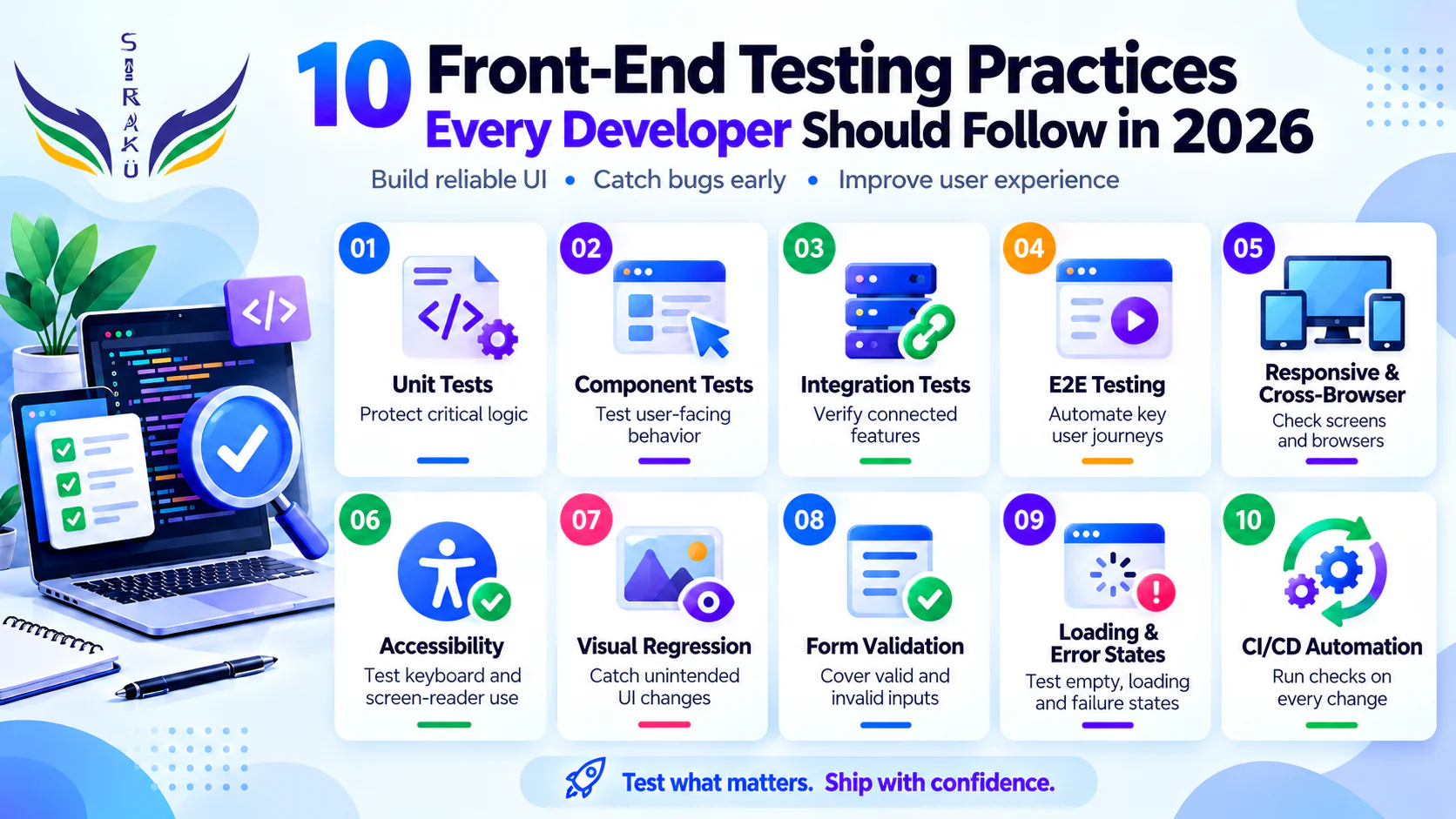
In 2026, developers should adopt a balanced testing strategy that combines unit testing, component testing, integration testing, end-to-end testing, accessibility checks, and visual regression testing. Tools such as Vitest, React Testing Library, Playwright, and axe-core can help automate these checks when used appropriately. The goal is to build front-end applications that are reliable, accessible, maintainable, and consistent across supported browsers and devices.
1. Write Unit Tests for Critical Business Logic
Unit testing is one of the foundations of a reliable front-end testing strategy. It involves testing small, isolated pieces of code, such as utility functions, data transformations, validation rules, and calculations. These tests help developers verify that a function produces the expected result for different inputs without requiring the entire application to run.
For example, an e-commerce application may calculate discounts, shipping costs, or product totals. A mistake in any of these calculations can affect the final price displayed to customers. Unit tests can verify normal cases, boundary values, and invalid inputs so that changes to the underlying logic do not introduce regressions.
Developers should prioritize logic that is important to the application rather than testing every trivial function. Pure functions are especially suitable for unit testing because their outputs depend on their inputs and they do not require external state or network access.
Consider the following example using Vitest:
					import { describe, it, expect } from "vitest";

function calculateDiscount(price, percentage) {
  return price - (price * percentage) / 100;
}

describe("calculateDiscount", () => {
  it("calculates a discount correctly", () => {
    expect(calculateDiscount(100, 20)).toBe(80);
  });

  it("returns the original price for a zero discount", () => {
    expect(calculateDiscount(100, 0)).toBe(100);
  });
});
This example verifies two important scenarios. Additional tests could cover invalid percentages, negative prices, or the application’s chosen rounding rules. The correct expectations should reflect the actual business requirements.
The key practice is to write tests that protect important behavior, especially when that behavior is likely to change or would be costly to break.

2. Test Components from the User's Perspective
Component testing verifies that individual UI components render and behave correctly. In modern front-end frameworks, components often contain conditional rendering, event handlers, state updates, form controls, and interactions with other components. Testing these behaviors helps prevent regressions when a component is modified or reused elsewhere.
A useful principle is to test components through the interfaces available to users. For example, a button should be tested by finding it through its accessible role and clicking it, rather than by inspecting internal implementation details. This approach makes tests more resilient to harmless refactoring and encourages accessible markup.
React Testing Library supports this style of testing by encouraging developers to query the rendered interface using roles, labels, and visible text. When combined with a test runner such as Vitest, it provides a practical way to verify component behavior.
					import { render, screen } from "@testing-library/react";
import userEvent from "@testing-library/user-event";
import { expect, it, vi } from "vitest";

function SaveButton({ onSave }) {
  return <button onClick={onSave}>Save changes</button>;
}

it("calls the save handler when clicked", async () => {
  const user = userEvent.setup();
  const saveSpy = vi.fn();

  render(<SaveButton onSave={saveSpy} />);

  await user.click(
    screen.getByRole("button", { name: "Save changes" })
  );

  expect(saveSpy).toHaveBeenCalledOnce();
});
In this example, vi.fn() creates a mock function that records calls. The test verifies that clicking the button invokes the supplied handler.
For components that update visible state, test the resulting UI as well as the event handler. For example, after submitting a form, verify that the expected success message appears. This gives developers confidence that the component behaves correctly from the user’s point of view.
3. Cover Integration Testing Between Components and Services
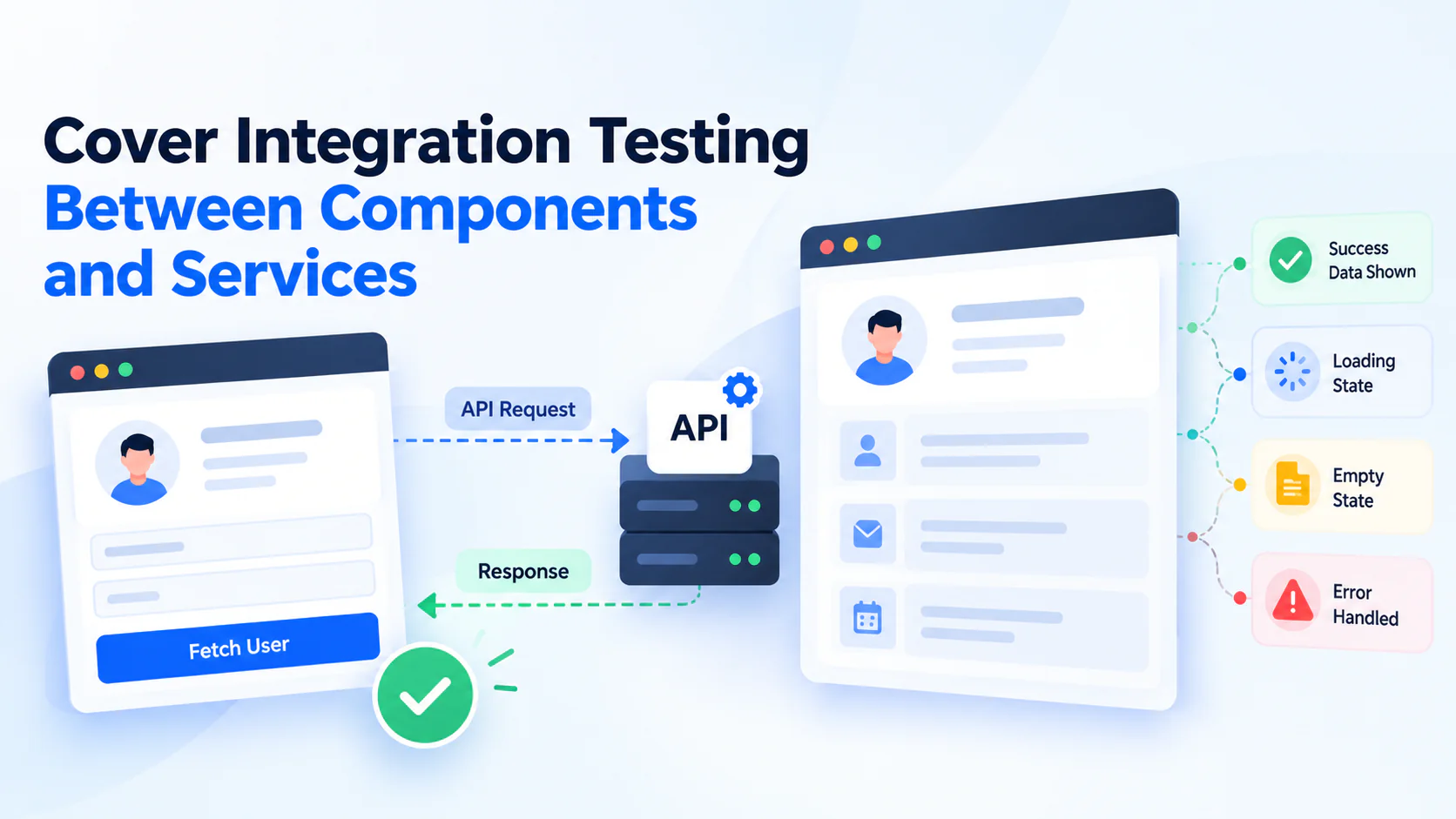
Unit tests verify individual pieces of code, but they do not always reveal problems that occur when multiple parts of an application work together. Integration testing focuses on these interactions, such as a form communicating with an API service, a component receiving updated props, or a page displaying data returned by a state-management layer.
Consider a dashboard that fetches user information from an API. The API request may work correctly in isolation, and the dashboard component may render correctly with predefined data. However, the complete feature could still fail if the response is mapped incorrectly, the loading state never disappears, or an error response is handled improperly.
Integration tests help identify these issues by verifying the behavior of connected parts of the application. Developers can mock external API requests when they want predictable test conditions, while still exercising the application’s real request-handling and rendering logic. For scenarios that require confidence in the actual backend contract, contract tests or tests against a controlled test environment can complement mocked integration tests.
Important scenarios to cover include:
- Successful API responses and correct data rendering.
- Loading indicators while a request is pending.
- Empty responses and empty-state messages.
- Failed requests and appropriate error messages.
- Form submissions and the resulting UI updates.
The goal is to verify that connected components behave correctly together without making every test dependent on a live external service.
4. Automate End-to-End Testing for Critical User Journeys
End-to-end (E2E) testing verifies an application through a real browser from the user’s perspective. Instead of testing a single function or component, an E2E test follows a complete workflow, such as signing in, searching for a product, adding it to a cart, and completing checkout.
This testing approach is especially valuable because a user journey can depend on several interconnected layers, including routing, UI state, API communication, authentication, and form validation. A defect in any of these areas can prevent the user from completing the task, even when individual components pass their tests.
Playwright is a widely used option for browser automation. It supports browser interaction, assertions, multiple browser engines, and tools for investigating test failures. Developers should focus E2E coverage on business-critical workflows instead of reproducing every possible interaction at the browser level.
For example, a Playwright test might verify that a user can submit a login form and reach the dashboard:
					import { test, expect } from "@playwright/test";

test("user can sign in", async ({ page }) => {
  await page.goto("/login");

  await page.getByLabel("Email").fill("user@example.com");
  await page.getByLabel("Password").fill("test-password");

  await page.getByRole("button", { name: "Sign in" }).click();

  await expect(page).toHaveURL(/dashboard/);
  await expect(
    page.getByRole("heading", { name: "Dashboard" })
  ).toBeVisible();
});
This example assumes the application exposes appropriately labeled form controls and a dashboard heading. The test environment must also provide a predictable authentication setup, such as a dedicated test account or controlled authentication service.
Developers should avoid making every test depend on unstable third-party services. Where appropriate, use controlled test data and mock external dependencies. Run critical workflows in continuous integration so that regressions can be detected before changes are released.
For further guidance, see the official Playwright testing best practices.
5. Test Responsive Layouts Across Viewports and Browsers
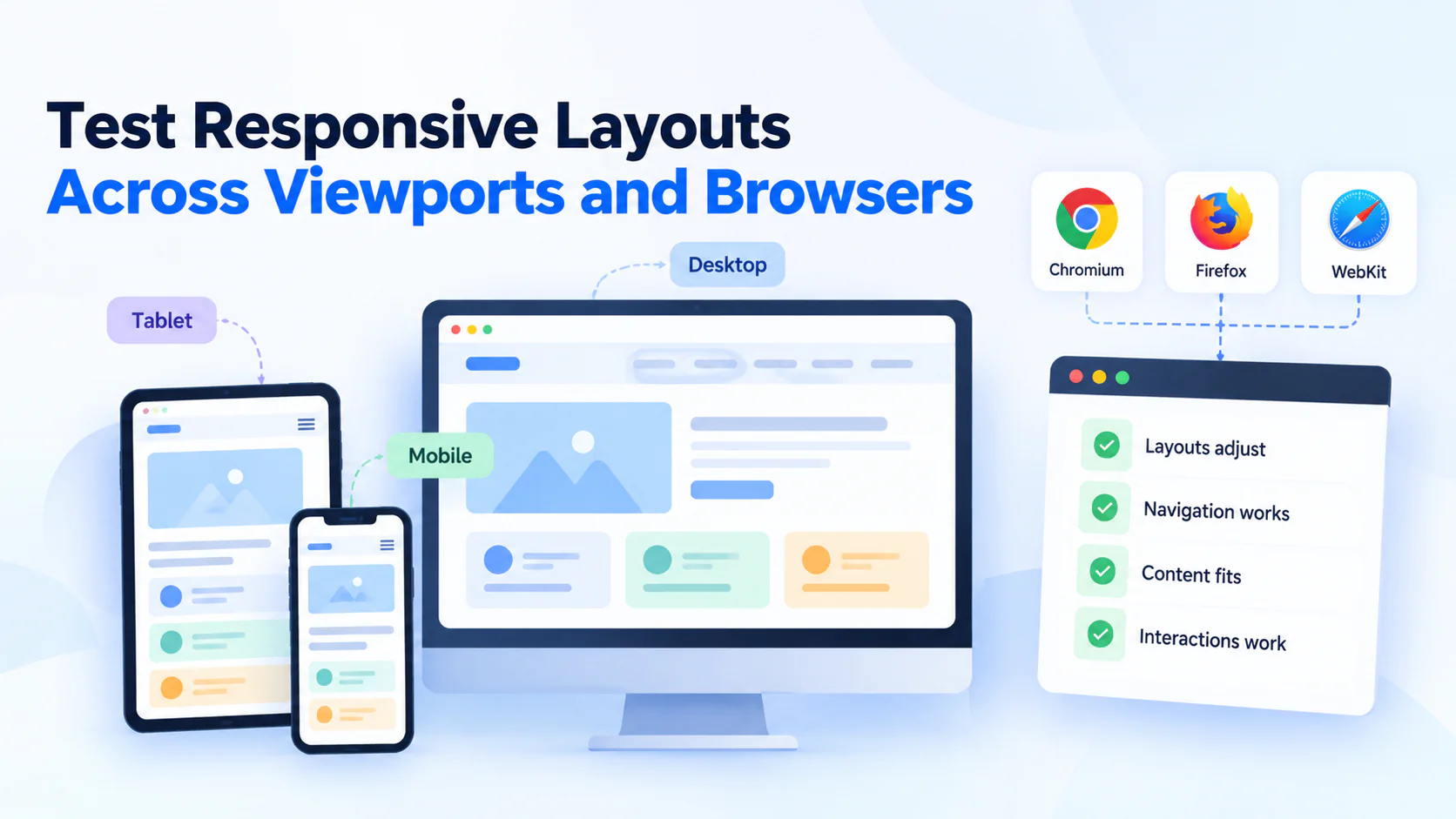
A front-end application may look correct on a desktop monitor but become difficult to use on a mobile phone or tablet. Elements can overlap, navigation menus can become inaccessible, text can overflow, and interactive controls can move outside the visible area. Responsive testing helps identify these issues before users encounter them.
Developers should test representative viewport sizes based on the application’s supported devices and actual layout breakpoints. Testing only one desktop resolution is insufficient for applications that use responsive grids, flexible navigation, adaptive images, or mobile-specific interactions.
Responsive testing should also include more than resizing the browser. Important scenarios include opening and closing mobile navigation, using forms on narrow screens, viewing long text, interacting with modals, and checking whether content remains usable when the viewport changes.
Cross-browser testing is equally important. Modern browsers generally support many of the same web standards, but differences in rendering, browser APIs, form controls, and CSS behavior can still cause inconsistencies. Playwright can run automated tests in Chromium, Firefox, and WebKit, helping teams cover representative browser engines.
A practical strategy is to:
- Test the application’s documented minimum and maximum supported viewport sizes.
- Include representative mobile, tablet, and desktop layouts.
- Verify important interactions at narrow widths, not just visual appearance.
- Run critical browser tests against the engines relevant to the target audience.
- Supplement automation with real-device checks when hardware-specific behavior matters.
The objective is not to test every possible device and resolution. It is to select meaningful combinations that cover the application’s supported layouts and browsers.
6. Include Accessibility Testing in Your Test Suite
Accessibility testing verifies whether people with different abilities can perceive, navigate, and interact with a website. It is an essential part of front-end quality because a visually correct interface can still create barriers for users who rely on keyboards, screen readers, browser zoom, or other assistive technologies.
Developers should start with semantic HTML, correctly associated form labels, meaningful alternative text for informative images, visible keyboard focus, and appropriate accessible names for interactive elements. Native HTML controls should generally be preferred over custom controls because they provide built-in interaction and accessibility behavior.
Automated accessibility tools such as axe-core can detect many common issues, including certain missing labels, invalid ARIA attributes, and color-contrast problems. These tools are useful during development and in continuous integration, but they cannot identify every accessibility barrier. Manual testing is still necessary to evaluate keyboard navigation, focus order, screen-reader announcements, and the usability of complex interactions.
For example, an automated accessibility check can be added to a Playwright test:
					import { test, expect } from "@playwright/test";
import AxeBuilder from "@axe-core/playwright";

test("homepage has no detected accessibility violations", async ({ page }) => {
  await page.goto("/");

  const results = await new AxeBuilder({ page }).analyze();

  expect(results.violations).toEqual([]);
});
This test fails when axe-core reports violations in the scanned page. The absence of detected violations does not prove complete accessibility, so teams should combine automated checks with manual evaluation and testing against applicable accessibility requirements.
Accessibility testing should be part of normal development rather than a final check performed only before launch.
7. Use Visual Regression Testing to Catch UI Changes
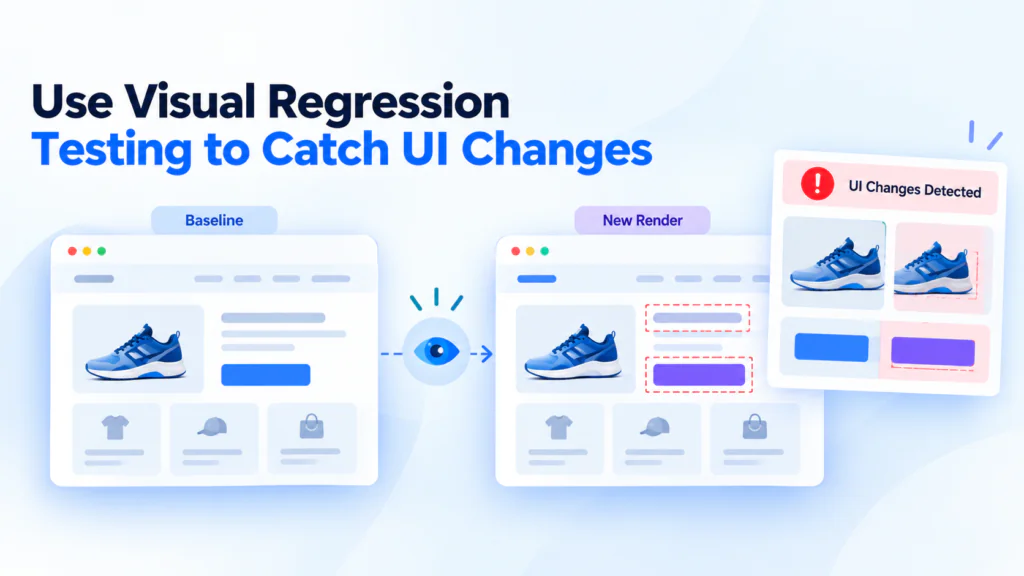
Functional tests verify what an application does, but they may not detect unintended visual changes. A button can still work while appearing in the wrong position, a heading can overflow its container, or a CSS change can alter spacing across several pages. Visual regression testing helps identify these problems by comparing screenshots against approved reference images.
Tools such as Playwright screenshot assertions and Vitest’s browser visual regression capabilities can automate these comparisons. Developers capture a baseline image, run the test after a change, and inspect differences between the baseline and the new rendering.
For example, a visual test can verify that a product card maintains its expected appearance. When the component’s layout changes unexpectedly, the screenshot comparison can flag the difference for review.
However, visual regression testing requires a stable environment. Differences in browser versions, fonts, operating systems, animations, dynamic content, and image loading can produce noisy results. Teams should use consistent viewport sizes, control test data, and manage animations where appropriate.
Visual comparisons also need human judgment. An intentional redesign should result in an approved baseline update, whereas an unexpected layout shift should be investigated rather than automatically accepted.
Visual testing works best alongside functional tests, not as a replacement for them. A screenshot can show that a page looks different, but it cannot establish by itself whether a form submits correctly or a button performs the right action.
8. Test Form Validation and Error Handling Thoroughly
Forms are among the most important interactive elements in front-end applications. Registration, login, payment, search, and contact forms all depend on correct input handling and clear feedback. A form that accepts invalid data, silently ignores errors, or displays misleading messages can frustrate users and compromise the quality of the application.
Developers should test both valid and invalid input scenarios. This includes required fields, malformed email addresses, minimum and maximum lengths, boundary values, unexpected characters, and submission attempts when required information is missing. The expected behavior should follow the application’s actual validation rules rather than assumptions made during testing.
Asynchronous form behavior deserves particular attention. When a form submits data to a server, the interface should handle pending requests, successful responses, validation errors returned by the server, and unexpected failures. Repeated submissions should also be considered when duplicate requests could create unwanted results.
Useful form-testing scenarios include:
- Submitting a form with valid information.
- Submitting empty or invalid required fields.
- Displaying field-specific validation messages.
- Preserving appropriate input values when validation fails.
- Showing a loading state during asynchronous submission.
- Displaying meaningful feedback when the server rejects a request or becomes unavailable.
- Verifying keyboard navigation and accessible error announcements.
Client-side validation improves the user experience, but it must not be treated as a security boundary. The server must independently validate and authorize incoming data because client-side checks can be bypassed.
9. Test Loading, Empty, Error, and Edge States
A common testing mistake is to verify only the ideal state of a component. Real applications must also handle situations where data is unavailable, requests take longer than expected, users have no saved items, or a service returns an error.
These states are especially important in interfaces that rely on remote APIs. For example, a product listing should not display a blank page indefinitely when a request fails. It should communicate the problem and, where appropriate, provide a retry option. Similarly, a dashboard with no data should display a useful empty state instead of appearing broken.
Developers should explicitly test the different states that a component or page can enter. This can often be done using controlled promises, mocked network responses, or predefined component props. Testing these scenarios without relying on unpredictable network conditions makes the test suite more reliable.
Edge cases should also reflect the application’s domain. A pagination component may need to handle a single page, a large number of pages, and navigation at the first or last page. A search component may need to handle empty input, no matching results, and rapid successive queries.
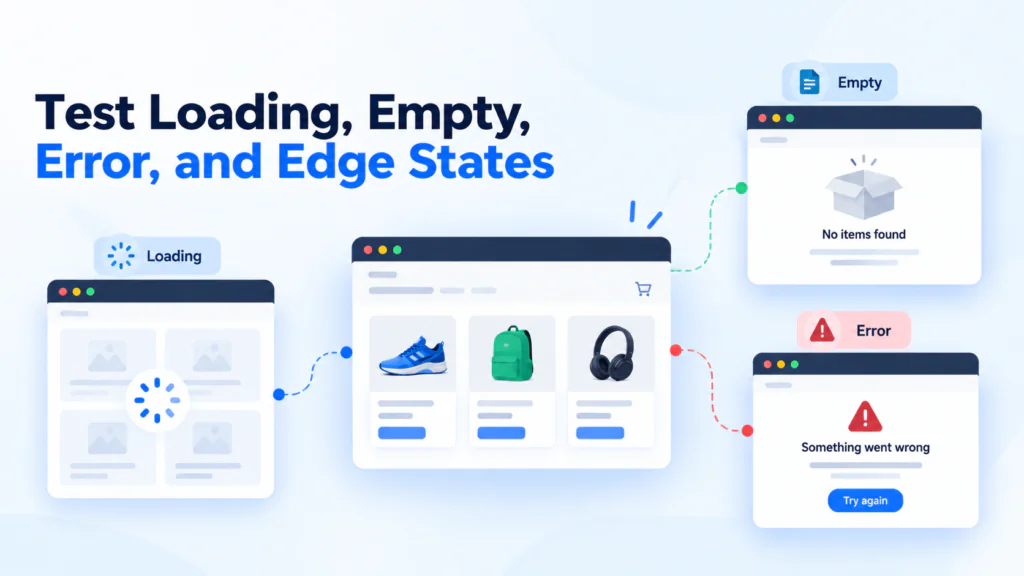
For API-driven components, consider verifying:
- Loading indicators and transitions after data arrives.
- Empty responses and missing optional fields.
- Network failures, server errors, and invalid response data.
- Retry behavior and recovery after a failed request.
- Boundary values and unexpected but valid inputs.
Testing these conditions makes the interface more resilient and helps prevent failures that might otherwise appear only under real-world conditions.
10. Integrate Automated Tests into CI/CD Pipelines
Automated tests provide the greatest long-term value when they run consistently. If developers execute tests only before a release, defects may remain undetected while changes accumulate. Continuous integration (CI) helps solve this problem by running selected checks whenever code is pushed or a pull request is opened.
A typical front-end CI pipeline can include linting, type checking where applicable, unit tests, component or integration tests, and selected E2E tests. More expensive browser or visual regression suites can run in parallel, on pull requests, or at other suitable points in the release workflow.
The goal is to detect problems early without making the development process unnecessarily slow. Small, isolated tests can usually run frequently, while broader browser suites may require additional setup and execution time.
For example, a project using npm and Vitest might define test scripts in its package.json:
					{
  "scripts": {
    "test": "vitest run",
    "test:watch": "vitest"
  }
}
The test command runs Vitest in non-watch mode, which is suitable for a CI job. The test:watch command is useful for interactive local development. This configuration assumes Vitest is installed and configured in the project.
Teams should also make test failures actionable. A good pipeline provides clear failure reports, preserves relevant browser traces or screenshots, and distinguishes genuine regressions from unstable tests. Flaky tests should be investigated rather than repeatedly ignored or automatically retried without understanding the cause.
A practical CI/CD strategy should:
- Run fast checks early to provide quick feedback.
- Execute tests in a predictable environment.
- Keep test data isolated and reproducible.
- Publish reports and useful debugging artifacts.
- Review failures before merging or releasing changes.
- Track slow and flaky tests and improve them over time.
Automated testing does not eliminate the need for code review or production monitoring. Instead, it provides an additional layer of confidence that helps teams deliver changes more safely.
Choosing the Right Front-End Testing Tools in 2026
Selecting the right testing tools depends on the application’s framework, architecture, build system, and testing requirements. There is no single tool that handles every type of front-end testing equally well. Developers should choose a combination of tools that provides the required coverage without creating unnecessary complexity.
For unit and integration testing, Vitest is a strong option, particularly for projects using Vite. It supports assertions, mocks, spies, code coverage, and integrations with front-end frameworks. Jest is another established option, especially for existing projects that already use its ecosystem. Teams do not need to migrate a working test suite simply because another test runner is available.
For component testing, React Testing Library encourages developers to verify components through accessible, user-facing behavior. Similar Testing Library packages are available for other frameworks. Vitest also offers Browser Mode and framework-specific component-testing integrations, allowing teams to choose an appropriate setup for their application. The execution environment matters: a DOM simulator and a real browser do not provide identical coverage of browser behavior.
For end-to-end testing, Playwright is useful when developers need browser automation, cross-browser execution, and detailed debugging support. Cypress is another option for teams that prefer its testing workflow and ecosystem. The choice should consider existing infrastructure, team experience, browser requirements, and maintenance costs rather than popularity alone.
Accessibility testing can be supplemented with axe-core, while visual regression testing can use Playwright screenshots or dedicated visual-testing services. Neither type of tool replaces manual review where human judgment is necessary.
Building a Practical Testing Pyramid for Modern Web Applications
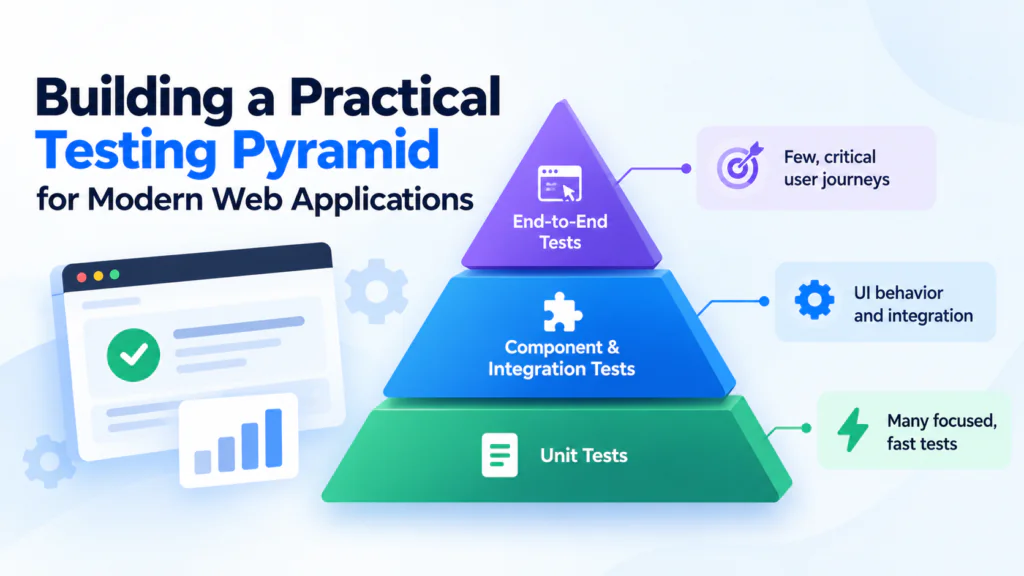
The testing pyramid is a useful model for distributing tests across different levels. Its central idea is to maintain a strong foundation of fast, focused tests while using a smaller number of broader tests to verify complete workflows. It is a planning guideline, not a strict rule that every application must follow.
At the base of the pyramid are unit tests. These tests cover isolated business logic, utility functions, data transformations, and validation rules. Because they generally run quickly and are easier to diagnose, developers can maintain a substantial collection of them.
The middle layer contains component and integration tests. These verify interactions between UI elements, application state, and services. They can reveal problems that isolated unit tests miss, such as a component failing to display an API response or a form not updating after submission.
At the top are end-to-end tests. These exercise complete user journeys in a browser and can catch failures involving routing, application configuration, authentication, and communication between multiple layers. They usually require more setup and can take longer to execute, so they are best focused on the workflows that matter most.
Common Front-End Testing Mistakes and How to Avoid Them
Even teams that use modern testing tools can build unreliable test suites when they focus on the wrong things. One common mistake is testing implementation details instead of user-visible behavior. For example, a test that checks a component’s internal state variable may fail after harmless refactoring, even when the interface still works correctly. Prefer testing accessible elements, user interactions, and visible outcomes whenever practical.
Another mistake is relying on code coverage as the sole measure of test quality. Coverage reports can show which lines or branches executed, but they cannot prove that assertions are meaningful or that the expected behavior is correct. A test suite can achieve high coverage while missing important business scenarios. Use coverage as a diagnostic tool and review whether tests actually verify meaningful outcomes.
Overusing end-to-end tests can also create unnecessary maintenance costs. Testing every minor calculation or button interaction through a full browser workflow makes feedback slower and can make failures harder to diagnose. Use focused unit and component tests for local behavior, reserving E2E tests for workflows that benefit from complete browser-level verification.
Flaky tests are another major problem. Tests that fail intermittently because of arbitrary delays, shared test data, uncontrolled network requests, or timing assumptions reduce confidence in the entire suite. Prefer condition-based assertions, isolated data, controlled dependencies, and the waiting mechanisms provided by the testing framework. Retries can help gather diagnostic evidence, but they should not be used to conceal recurring failures.
Developers should also avoid testing only successful scenarios. Missing error handling, invalid form inputs, empty responses, permission failures, and loading states are frequent sources of defects. Include realistic failure conditions and edge cases in the test plan, particularly for features that depend on APIs or external services.
Other mistakes worth avoiding include:
- Writing tests with vague names that make failures difficult to understand.
- Using arbitrary timeouts when the framework provides reliable condition-based waiting.
- Depending on production services or shared accounts without appropriate isolation.
- Updating visual baselines automatically without reviewing unexpected differences.
- Treating automated accessibility scans as proof of complete accessibility.
- Ignoring failing tests or routinely skipping them to unblock builds.
- Testing every trivial implementation detail while leaving critical user journeys untested.
The best way to avoid these problems is to treat tests as maintained software. Keep them readable, deterministic, focused, and aligned with actual requirements. When a test fails, investigate whether the application behavior is wrong, the test expectation is outdated, or the testing environment is unstable. This discipline helps keep the suite useful as the application grows.
Conclusion
Front-end testing in 2026 is about more than checking whether a page renders without errors. It involves verifying business logic, testing component interactions, validating complete user journeys, checking responsive behavior, improving accessibility, detecting visual regressions, and ensuring that applications handle unexpected conditions gracefully.
The most effective approach is to combine different testing techniques according to their strengths. Unit tests protect critical logic, component and integration tests verify connected behavior, and E2E tests confirm that important workflows function correctly in a browser. Accessibility and visual regression checks provide additional coverage for issues that functional assertions alone may miss.
Choosing the right tools and organizing tests using a practical testing pyramid can help developers maintain a suite that is both effective and manageable. Integrating automated checks into CI/CD pipelines further reduces the risk of regressions by making testing part of the everyday development workflow.
Developers do not need to automate every possible scenario from the beginning. They can start by identifying the application’s most important features, writing meaningful tests for those features, and gradually expanding coverage as the codebase evolves.
Ultimately, a strong front-end testing strategy is not measured solely by code coverage or the number of test cases. It is measured by how effectively it detects meaningful defects, protects user experience, and helps developers make changes with confidence.