
Headless CMS Multi-Environment Management
: Best Practices for Development, Staging, and Production
Managing multiple environments in a Headless CMS helps development teams build, test, and release changes without unnecessarily affecting live applications. Separate development, staging, and production setups reduce configuration mistakes and unexpected content issues. They also help developers, QA engineers, and content editors collaborate more effectively. A structured environment management strategy makes releases more predictable, secure, and easier to maintain.
What Is Multi-Environment Management in a Headless CMS?
Multi-environment management is the practice of maintaining separate configurations and workflows for developing, testing, and running a Headless CMS application. Depending on the CMS platform, environments may be implemented through separate projects, spaces, datasets, branches, or environment-specific content configurations. Each setup has a defined purpose, access policy, and release process. This separation allows teams to test changes before introducing them into production.
A Headless CMS setup may include content models, content entries, API credentials, frontend applications, integrations, and deployment settings. However, these components do not necessarily move between environments together. Frontend code may be deployed through a CI/CD pipeline, while content model changes may require migration scripts or platform-specific promotion features. Understanding which components are transferred and which must be configured separately is essential for a reliable release workflow.
Understanding the Three Main Environments
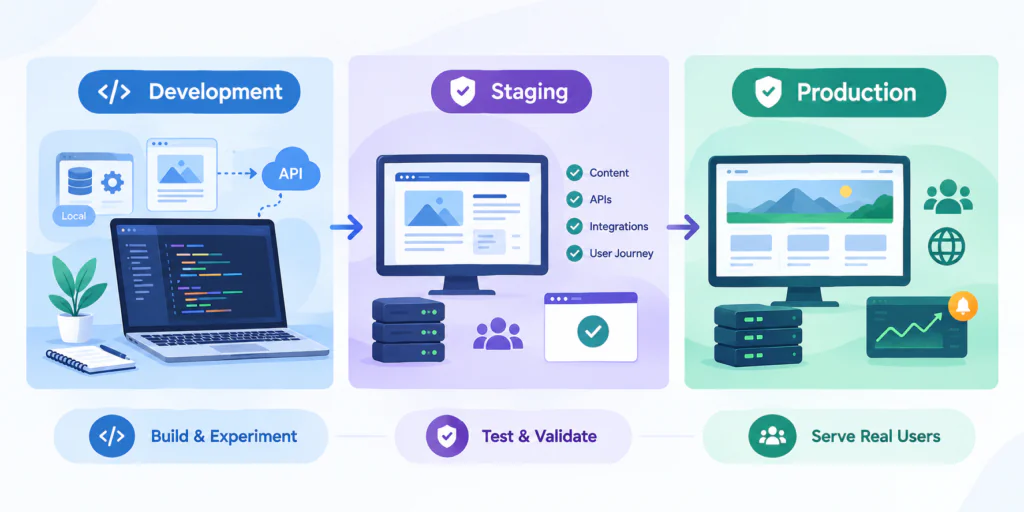
1. Development Environment
The development environment is where developers build features, update content models, test API integrations, and experiment with application changes. It may use local services, shared development resources, test content, and development-specific credentials. Developers can test new functionality without directly affecting the live application. Production credentials and sensitive production data should not be exposed unnecessarily in this environment.
To improve development efficiency, teams can use sample content, mock API responses, local configuration files, and automated setup scripts. When a content model changes, developers should verify that the frontend and integrations can handle the updated structure. These checks help identify compatibility issues before changes reach staging. Development environments should also be documented so that team members can reproduce the setup consistently.
2.Staging Environment
The staging environment is used to validate application and CMS changes before production release. It should resemble production in relevant areas, such as frontend configuration, API behavior, integrations, and deployment settings. QA engineers, developers, and authorized content editors can test content rendering, previews, publishing workflows, and critical user journeys. This provides an opportunity to discover issues that may not appear during local development.
Staging should use the appropriate credentials and integrations for its own environment. Teams should test representative content, including optional fields, missing values, and unusual data combinations. When production-like content is needed, use sanitized or anonymized data where appropriate to avoid exposing personal or confidential information. A successful staging test reduces risk, but it does not guarantee that production will behave identically.
3.Production Environment
The production environment serves the live website, applications, and other customer-facing channels. It contains the content and configuration intended for real users. Because changes can affect business operations directly, production access should be restricted and releases should follow an established review process. Monitoring and recovery procedures should be prepared before deploying significant changes.
Production management also requires careful handling of application releases and CMS changes. A frontend deployment can introduce errors even when the CMS remains available, while an incompatible content model change can break API queries or page rendering. Teams should monitor application errors, verify important content, and confirm that critical user journeys work after deployment. Recovery plans should distinguish between rolling back application code and restoring or correcting CMS content and configuration
Key Differences Between Environments
Each environment has a different purpose, so its configuration, permissions, and release controls should reflect that role. Development prioritizes flexibility, staging prioritizes validation, and production prioritizes reliability. Environments may share source code while using different data, credentials, and integration settings. Clear distinctions help prevent testing activity from affecting live users.
Area | Development | Staging | Production |
Primary purpose | Build and experiment | Test and validate | Serve real users |
Content | Sample or development content | Representative test content | Approved live content |
Configuration | Development-specific | Staging-specific | Production-specific |
Access | Development team | Authorized QA, developers, editors | Restricted authorized users |
Releases | Frequent development changes | Controlled validation | Reviewed and approved releases |
Monitoring | Development diagnostics | Release and integration checks | Production alerts and monitoring |
These are general guidelines rather than fixed rules. The exact separation of content, permissions, and configuration depends on the CMS architecture and the deployment model your team uses.
Best Practices for Managing Headless CMS Environments
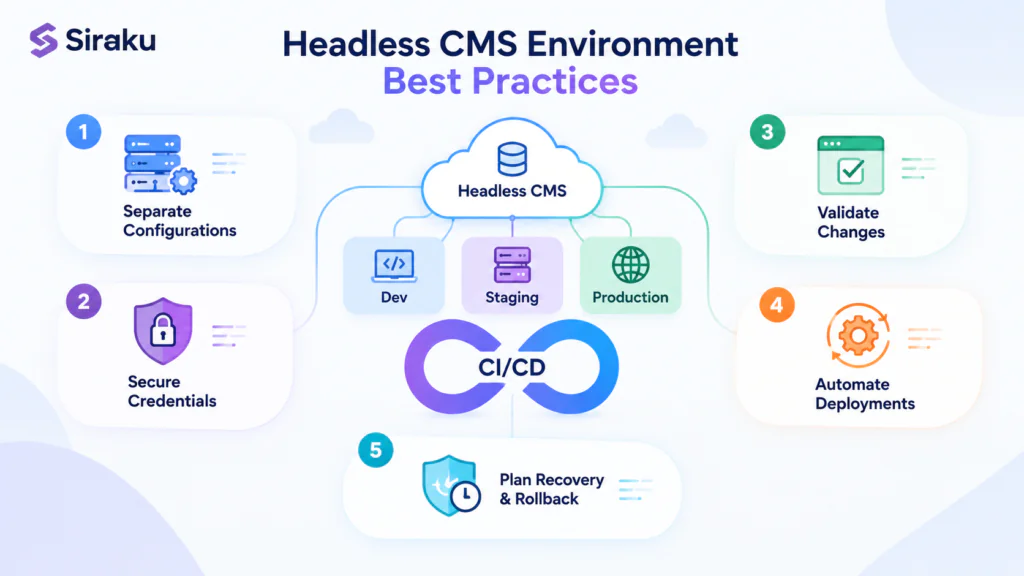
Effective environment management requires consistent configuration, clear responsibilities, and repeatable release procedures. Teams should document which settings differ between environments and how changes are promoted. This documentation should cover API endpoints, credentials, content model changes, integrations, and frontend deployment settings. A standardized process makes configuration differences easier to identify and reduces deployment-related incidents.
1.Keep Environment Configurations Separate
Each environment should use the appropriate API endpoints, credentials, and application settings. Supply these values through environment variables or a configuration management system rather than hardcoding them into application source code. Deployment pipelines should validate required configuration before releasing an application. This reduces the risk of a development frontend connecting to production content unintentionally.
For example, an application may use a different CMS dataset, space environment, project, or API endpoint for each deployment. The correct approach depends on the selected platform. Server-side credentials and write-enabled tokens must remain private and should never be exposed through browser code. Teams should also avoid copying production secrets into local configuration files or shared development environments.
2.Secure Credentials and Access Permissions
Credentials should be managed according to their privileges and the environment they can access. Use the least-privilege principle so that each developer or service receives only the permissions required for its responsibilities. A secrets manager or protected CI/CD variables can help control access to sensitive values. Credentials should be rotated when necessary and revoked when they are no longer required.
Permissions should also distinguish between editing content, publishing content, and changing environment configuration. Not every developer or content editor needs administrative access to production. Role-based access controls, audit logs, and approval procedures help teams identify who made a change and when. Because some CMS platforms manage permissions at the project or space level, verify the platform’s actual permission model instead of assuming every environment has independent access controls.
3.Validate Changes Before Production
Every significant change should be tested in an environment appropriate to its risk. Testing may include frontend rendering, API queries, authentication, content previews, publishing behavior, and integration checks. Content model changes require particular attention because changing field names, field types, or required values can affect existing content and frontend components. Staging helps identify these issues before they affect live users.
Automated checks can make validation more consistent. A CI/CD pipeline can run unit tests, integration tests, schema validation, and frontend build checks before deployment. Manual review may still be necessary for editorial workflows, visual presentation, and business requirements. For high-risk schema or content migrations, test the migration against a non-production environment and review the results before running it against production.
4.Automate Deployments with CI/CD
Continuous integration and continuous deployment (CI/CD) pipelines help teams build, test, and release application changes consistently. A pipeline can run automated tests, build the frontend, verify required configuration, and deploy the application to a target environment. Production deployments can include an approval step before release. This approach reduces manual work and makes application releases easier to audit.
However, deploying frontend code does not automatically transfer CMS content models, entries, or settings. These may require separate migration scripts, CMS APIs, environment promotion features, or manual configuration. Teams should document how each type of change is promoted and verify the resulting state in the target environment. Version-controlled migration scripts can help make supported CMS changes repeatable and traceable.
5.Plan Recovery and Rollback Procedures
A release process should include a clear recovery strategy in case a deployment fails. Application code may be rolled back to a previous build, while CMS content models and entries may require separate recovery steps. The appropriate approach depends on the CMS platform, the type of change, and whether the change is reversible. Teams should test their recovery procedures rather than assuming every change can be undone automatically.
Before a high-risk release, identify the affected components and decide how to restore service if something goes wrong. Deployment history, version-controlled configuration, appropriate backups, and monitoring can support recovery. Schema changes that rename or remove fields may require a forward fix or a carefully planned migration instead of a simple rollback. Restoring content also requires a suitable recovery method for the specific CMS and its data model.
Managing Content Models and Configuration Changes
Content model changes need special attention because they affect how content is structured, validated, retrieved, and rendered. For example, renaming a field or changing its data type may break frontend queries or integrations that depend on the original structure. Teams should review schema changes, identify dependent applications, and test representative content before releasing an update. Whenever possible, use backward-compatible changes during transitions.
A safer approach is to introduce new fields before removing old ones. The frontend can be updated to support the new structure, existing content can be migrated if required, and the old field can be removed only after dependencies have been checked. This staged approach reduces the risk of deploying a CMS change that immediately breaks the live application. The exact process depends on the CMS’s schema capabilities and migration tooling.
It is also important to distinguish content model changes from content entry changes. A content model defines the structure of information, while entries contain the actual content created by editors. Some platforms support environment cloning, schema deployment, branching, or content promotion, while others require explicit API operations or scripts. Teams should verify which models, entries, assets, permissions, and integrations are transferred by their platform’s environment operations.
Common Challenges and How to Avoid Them
Environment-related problems often occur when configurations drift or changes are promoted without adequate validation. For example, a staging application may point to the wrong API endpoint, lack a required credential, or use an integration that behaves differently in production. Content models may also differ between environments when updates are applied manually and inconsistently. These differences can cause an application to work in staging but fail after deployment.
Another challenge is accidentally publishing test content or changing the wrong environment. Similar environment names, shared credentials, and unclear permissions can increase this risk. Teams should label environments clearly, verify deployment targets, and restrict production publishing rights. Automated checks and documented release steps can prevent avoidable mistakes.
To reduce these risks, teams should:
- Maintain a configuration checklist for every environment.
- Validate required environment variables during deployment.
- Use appropriately scoped credentials and access permissions.
- Track content model changes through a repeatable process.
- Test integrations and frontend behavior before production releases.
- Use sanitized test data when production-like content is necessary.
- Monitor deployments and verify critical functionality afterward.
How to Build a Reliable Environment Promotion Workflow
A reliable workflow defines how application code, CMS configuration, and content changes move from development through staging and into production. Developers should first implement and test changes in development, then validate them in staging. Once testing and required approvals are complete, the approved release can be deployed to production. Each step should record what changed, which tests were completed, and who authorized the release.
A typical workflow includes the following steps:
Develop
Implement the application or CMS change in development.
Validate
Run automated tests and check content model compatibility.
Stage
Apply the change to staging and test integrations, previews, and frontend behavior.
Approve
Review test results and obtain the required release approval.
Deploy
Promote the approved changes using the documented platform-specific process.
Verify
Check application health, API responses, and critical content after release.
Not every CMS supports a single operation to promote all changes between environments. Application code, schemas, content entries, assets, and configuration may need different processes. Teams should adapt the workflow to the capabilities of their platform and avoid assuming that copying an environment is equivalent to promoting only the intended changes. The goal is to make each release traceable, repeatable, and validated.
Conclusion
Multi-environment management helps Headless CMS teams release changes with greater confidence while protecting live content and application stability. Separating development, staging, and production, securing configuration, and validating changes before deployment can prevent many common release issues. Teams should also account for platform-specific differences in schema management, content promotion, permissions, and recovery procedures. With a documented and repeatable workflow, teams can improve release reliability as their applications grow.